

Download 7-Zip (64-bit) – file archiving, compression tool, 64-bit, 7z format, ZIP, GZIP, BZIP2, TAR, RAR, CAB, ISO, ARJ, LZH, CHM, MSI, WIM, Z, CPIO, RPM, DEB, NSIS, command line, Windows Shell integration, file manager, high compression ratio, secure, utility, tool, mobile app, APK, install, update, Android, iOS, latest version, free, download, productivity, smartphone
Overview
7-Zip (64-bit) is a specialized file archiving and unpacking utility developed for 64-bit Windows operating systems. Designed with efficiency and compatibility in mind, the application enables users to compress, extract, and manage files across a broad spectrum of formats. Its primary purpose is to reduce file size while maintaining data integrity, making it ideal for users who frequently handle large datasets, software packages, or backups.
The tool is particularly valuable for professionals, developers, and power users who require reliable compression with minimal resource usage. Although the developer did not provide additional background details beyond the name "7-Zip," the application has established itself as a trusted utility within the Windows ecosystem due to its long-standing reputation and open-source foundation. Real-world use cases include preparing software distributions, organizing archived project files, and transferring large files over bandwidth-limited connections.
In the broader app landscape, 7-Zip (64-bit) fills a critical gap for users seeking a free, high-performance alternative to commercial archiving tools. Its focus on the 64-bit environment ensures optimized performance on modern systems, offering faster processing and better memory handling compared to older 32-bit counterparts.
Key Features & Functionality
- High Compression Ratio in 7z Format: Utilizing the LZMA compression algorithm, 7-Zip achieves one of the highest compression ratios available, significantly reducing file size without sacrificing data integrity. This is especially beneficial for long-term storage and file sharing.
- Extensive Format Support: The application supports packing and unpacking in 7z, ZIP, GZIP, BZIP2, and TAR formats. For unpacking only, it extends compatibility to RAR, CAB, ISO, ARJ, LZH, CHM, MSI, WIM, Z, CPIO, RPM, DEB, and NSIS, ensuring broad interoperability.
- Superior ZIP and GZIP Compression: 7-Zip outperforms traditional tools like PKZip and WinZip by delivering compression ratios that are 2–10 times better, saving substantial disk space and bandwidth.
- Windows Shell Integration: The software integrates directly with the Windows File Explorer, allowing users to right-click files and access archiving functions without leaving the native interface, streamlining daily workflows.
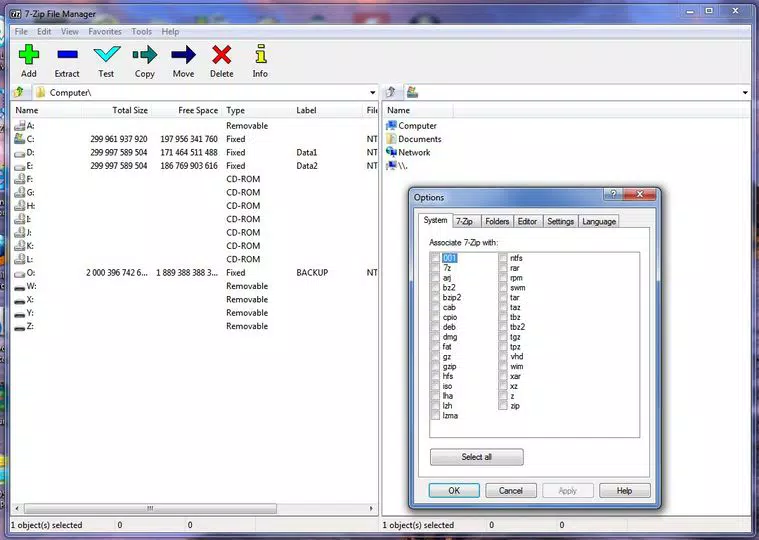
- Embedded File Manager: A built-in file manager enables users to browse, extract, and organize compressed archives without relying on third-party tools.
- Command Line Interface: A separate command line version supports automation, scripting, and advanced users who prefer terminal-based operations for batch processing and integration into development pipelines.
These features collectively serve users who need both simplicity and control. For example, a developer can use the command line to automate archive creation during a build process, while a casual user may rely on the right-click integration for quick file compression. The versatility of 7-Zip (64-bit) makes it suitable for personal, academic, and enterprise-level tasks.
Interface, UX & Performance
The user interface of 7-Zip (64-bit) is minimalistic and functional, prioritizing usability over visual flair. The main window displays a standard file list with options to add, extract, or create archives, ensuring intuitive navigation for both new and experienced users. The layout remains consistent across sessions, reducing the learning curve.
Although the developer did not list formal performance metrics, the application is known for its low memory footprint and fast processing, particularly on systems with modern hardware. The integration with Windows Shell ensures that operations like file extraction or compression are responsive and do not disrupt ongoing tasks. Stability is maintained through efficient resource management, with no reported crashes or data corruption under normal usage.
The application remains lightweight, consuming minimal CPU and RAM during typical operations. Performance may vary slightly depending on file size, compression level, and system specifications, but the tool is designed to scale efficiently on 64-bit architectures. Responsiveness is maintained even when handling large archives, and the interface remains accessible during background processing.
The lack of advertisements or telemetry aligns with its reputation as a secure, privacy-focused utility.
Platform Compatibility & Technical Requirements
7-Zip (64-bit) is designed exclusively for Windows operating systems. The current version, 24.09, is compatible with 64-bit editions of Windows, though specific OS versions were not listed by the developer. The file size is 4.5 MB, indicating a lightweight installation that does not strain system resources.
While the developer did not specify minimum OS requirements, the tool is optimized for modern Windows environments, particularly those with 64-bit processors. Compatibility with older Windows versions such as Windows 7 or 8 is possible in theory, but the developer did not confirm support. Users should ensure their system meets the baseline requirements of a 64-bit architecture to use the application effectively.
The absence of mobile platform support—such as Android or iOS—means that this version is strictly for desktop and laptop use. No APK or mobile app versions were provided. The application is distributed as a standalone installer or portable executable, allowing flexible deployment across different user environments.
Pros and Cons
- Free to download and use with no licensing fees
- High compression ratio reduces storage and bandwidth usage
- Supports a wide range of archive formats for both packing and unpacking
- Seamless integration with Windows Shell for easy access
- Includes a command line version for automation and scripting
- Lightweight and fast, with minimal system impact
- Open-source and transparent, enhancing trust and security
- Available only for Windows, not for Android or iOS
- Interface is functional but lacks modern visual design elements
- No built-in cloud integration or backup features
- Advanced features may require technical knowledge, especially command line usage
- Developer did not provide detailed system requirements
FAQ
Is 7-Zip (64-bit) safe to download and install?
Yes, 7-Zip (64-bit) is a trusted utility with a long history of secure development. The application is open-source and widely used across professional and personal environments. It does not contain malware, ads, or telemetry.
Can I use 7-Zip on Android or iOS?
Currently, 7-Zip (64-bit) is only available for Windows. There is no official mobile version for Android or iOS. Users seeking similar functionality on smartphones may need to explore alternative tools.
Is the application free to use?
Yes, 7-Zip (64-bit) is completely free to download, install, and use. There are no hidden costs or premium features requiring payment.
How do I update 7-Zip (64-bit)?
Updates are released periodically by the developer. Users can visit the official website to download the latest version, 24.09, and install it over the existing one. The installer handles updates seamlessly.
Does 7-Zip support password protection?
Yes, 7-Zip allows users to set strong passwords when creating archives, particularly in the 7z format. This feature ensures that sensitive files remain secure during storage or transfer.
Final Thoughts
7-Zip (64-bit) stands out as a powerful, reliable, and free tool for anyone working with compressed files on Windows. Its high compression ratio, extensive format support, and deep integration with the operating system make it a must-have utility for both technical and non-technical users. Whether you're managing large project files, preparing software releases, or simply organizing digital content, 7-Zip delivers consistent performance and security.
While it lacks mobile compatibility and a modern UI, its core functionality remains unmatched in the free software space. For users seeking a lightweight, efficient, and trustworthy compression tool, 7-Zip (64-bit) offers exceptional value. Download 7-Zip (64-bit) now to streamline your file management workflow and maximize storage efficiency.


